

⎮ 팀 프로젝트 4일차
어제 각각의 View를 Merge하는 작업을 마쳤다.
이렇게 하고나서 가장 큰 난관에 봉착했는데, 바로 Data Binding이었다.
어떻게 하면 데이터를 연동할 수 있을지 고민해보고, 이를 코드로 구현해야한다.
⎮ 데이터 바인딩1 : 로직 이해하기
팀에서 대화한 흐름은 다음과 같다.
* 전제
1. UISegmentedControl이 Index를 가지고 있다. (Index랑 뭘 매칭해주면 되겠구나)
2. 해당 Index를 토대로 데이터를 바꿔주고 싶다. (데이터가 따로 필요하겠구나)
* Data Flow
UISegmentedControl의 0번 인덱스(피규어)를 누르면, CollectionView에서도 피규어 데이터를 보여줬으면 좋겠고,
1번 인덱스(티셔츠)를 누르면, CollectionView에서도 티셔츠 데이터를 보여줬으면 좋겠다.
"UISegmentedControl의 0번 인덱스(피규어)를 누르면, CollectionView에서도 피규어 데이터를 보여줬으면 좋겠다"는 말은,
결국 UISegmentedControl의 인덱스를 CollectionView로 전달해줄 수 있어야한다는 말과 같다.
핵심적으로 요약하면
1. 데이터 저장하는 곳이 필요함
2. 해당 데이터와 UISegmentedControl의 Index를 매칭시키고
3. 매칭된 데이터를 CollectionView에 넘겨줘야 함.
⎮ 데이터 바인딩2 : 데이터 저장하기
먼저 데이터를 저장할 파일을 만들었다.(ProductDataManager.swift)
이후 enum Type으로 카테고리를 구분해주었다.
- ProductDataManager.swift
enum ProductCategory: Int {
    case figure = 0
    case tshirt
    case keyring
    case pillow
}
struct 형태로 데이터를 담아주었다.
struct ProductDataManager {
    static func getProducts(_ category: ProductCategory) -> [ProductModel] {
        switch category {
        case .figure:
            return [
                ProductModel(name: "피규어", backgroundColor: .white, imageName: "피규어", price: "3000원"),
                ProductModel(name: "피규어", backgroundColor: .white, imageName: "피규어", price: "3000원"),
                ProductModel(name: "피규어", backgroundColor: .white, imageName: "피규어", price: "3000원"),
                ProductModel(name: "피규어", backgroundColor: .white, imageName: "피규어", price: "3000원"),
                ProductModel(name: "피규어", backgroundColor: .white, imageName: "피규어", price: "3000원"),
                ProductModel(name: "피규어", backgroundColor: .white, imageName: "피규어", price: "3000원"),
                ProductModel(name: "피규어", backgroundColor: .white, imageName: "피규어", price: "3000원"),
                ProductModel(name: "피규어", backgroundColor: .white, imageName: "피규어", price: "3000원")
            ]
        case .tshirt:
            return [
                ProductModel(name: "티셔츠", backgroundColor: .white, imageName: "피규어", price: "5000원"),
                ProductModel(name: "티셔츠", backgroundColor: .white, imageName: "피규어", price: "5000원"),
                ProductModel(name: "티셔츠", backgroundColor: .white, imageName: "피규어", price: "5000원"),
                ProductModel(name: "티셔츠", backgroundColor: .white, imageName: "피규어", price: "5000원")
            ]
        case .keyring:
            return [
                ProductModel(name: "키링", backgroundColor: .white, imageName: "피규어", price: "3000원"),
                ProductModel(name: "키링", backgroundColor: .white, imageName: "피규어", price: "3000원"),
                ProductModel(name: "키링", backgroundColor: .white, imageName: "피규어", price: "3000원"),
                ProductModel(name: "키링", backgroundColor: .white, imageName: "피규어", price: "3000원")
            ]
        case .pillow:
            return [
                ProductModel(name: "베개", backgroundColor: .white, imageName: "피규어", price: "3000원"),
                ProductModel(name: "베개", backgroundColor: .white, imageName: "피규어", price: "3000원"),
                ProductModel(name: "베개", backgroundColor: .white, imageName: "피규어", price: "3000원"),
                ProductModel(name: "베개", backgroundColor: .white, imageName: "피규어", price: "3000원")
            ]
        }
    }
}
이렇게 담긴 데이터는 어딘가에서 사용해야 한다.
ProductDataManager의 함수는 static func으로 선언했는데,
   func getProducts(_ category: ProductCategory) -> [ProductModel] {
        switch category {
        case .figure:
            return [
                ProductModel(name: "피규어", backgroundColor: .white, imageName: "피규어", price: "3000원"),
                ProductModel(name: "피규어", backgroundColor: .white, imageName: "피규어", price: "3000원"),
                ProductModel(name: "피규어", backgroundColor: .white, imageName: "피규어", price: "3000원"),
                ....
만약 위의 코드처럼 일반 함수로 선언하면
다른 곳에서 접근할 수 없기 때문에 인스턴스를 만들어줘야 하겠지만,
    static func getProducts(_ category: ProductCategory) -> [ProductModel] {
        switch category {
        case .figure:
            return [
                ProductModel(name: "피규어", backgroundColor: .white, imageName: "피규어", price: "3000원"),
                ProductModel(name: "피규어", backgroundColor: .white, imageName: "피규어", price: "3000원"),
위 코드와 같이 static func으로 선언해주었기 때문에
인스턴스 생성 없이도 어디에서나 해당 함수에 접근할 수 있게 된다.
⎮ 데이터 바인딩3 : 데이터와 UISegmentedControl 매칭 시키기
데이터와 UISegmentedControl은 어떻게든 매칭시킬 수야 있겠지만,
UISegmentedControl View 안에는 데이터도, CollectionView도 없다.
그렇다면 어떻게 해야할까?
SegmentedControl, CollectionView의 인스턴스를 사용하는 ViewController에게 해당 역할을 일임해야 한다.
따라서 나는 delegate 패턴으로 ViewController에게 역할을 주고자 한다.
TopMenuBar에서 넘겨줘야하는 데이터는 Index이다.
protocol TopMenuBarDelegate: AnyObject {
    func topMenuBar(_ topMenuBar: TopMenuBar, didSelectIndex index: Int)
}
위의 protocol은 topMenuBar(segment)의 index를 넘겨주는 protocol이다.
그리고, TopMenuBar에서 delegate 프로퍼티를 TopMenuBarDelegate protocol로 지정하였다.
class TopMenuBar: UIView {

    weak var delegate: TopMenuBarDelegate?
그리고 버튼이 눌리면,
    @objc
    func changeUnderBarPosition(_ segment: UISegmentedControl) {
        let segmentCount = segmentControl.numberOfSegments

        ........

        delegate?.topMenuBar(self, didSelectIndex: segment.selectedSegmentIndex)
    }
delegate가 해당 함수를 실행할 것이다.
ViewController에서 TopMenuBarDelegate protocol을 채택하면,
class ViewController: UIViewController, TopMenuBarDelegate {
protocol이 가지고 있는 메서드를 반드시 구현해야하고,
    func topMenuBar(_ topMenuBar: TopMenuBar, didSelectIndex index: Int) {
        // topMenuBar의 index를 int로 받았기 때문에 그 index가 ProductCategory rawValue로 들어감
        guard let category = ProductCategory(rawValue: index) else {
            return
        }

        // 해당 category(예를 들면 0번 인덱스면, 피규어)에 해당하는 값이 currentData에 담김
        currentData = ProductDataManager.getProducts(category)

        // 그 data에 맞게 collectionView data를 reload함
        productCollectionView.collectionView.reloadData()
    }
여기서 이 currentData는 가변적이어야 하기 때문에
class ViewController: UIViewController, TopMenuBarDelegate {

    var currentData: [ProductModel] = []
다음과 같이 빈 배열로 선언해주어,
topMenuBar의 index가 바뀔때 다른 데이터가 들어오면 해당 배열로 변경되게끔 만들어두었다.
    override func viewDidLoad() {
        super.viewDidLoad()
        view.backgroundColor = .white
        configureLayout()
        configureCollectionView()

        // 여기서 topMenuBar의 delegate가 viewController임을 명시하고
        topMenuBar.delegate = self
        // topMenuBar 메서드를 실행함으로써 초기 index를 0으로 잡아두었다.
        topMenuBar(topMenuBar, didSelectIndex: 0)
    }
⎮ 데이터 바인딩4 : 해당 데이터를 받아 CollectionView에 Update하기
이제 데이터는 채워졌고, CollectionView에서 해당 데이터를 받아서 컴포넌트를 채워야한다.
extension ViewController: UICollectionViewDataSource {
    //컬렉션뷰의 섹션 개수
    func numberOfSections(in collectionView: UICollectionView) -> Int {
        return 1
    }

    // 여기서 currentData의 개수만큼 Section을 만들게 세팅
    func collectionView(_ collectionView: UICollectionView, numberOfItemsInSection section: Int) -> Int {
        return currentData.count
    }

    //여기서 currentData의 indexPath에 있는 item을, 해당 셀에 하나씩 넣어준다.
    func collectionView(_ collectionView: UICollectionView, cellForItemAt indexPath: IndexPath) -> UICollectionViewCell {
        guard let cell = collectionView.dequeueReusableCell(withReuseIdentifier: MyCollectionViewCell.identifier, for: indexPath)
                as? MyCollectionViewCell else {
            fatalError()
        }
        let item = currentData[indexPath.item]
        cell.configure(with: item)

        return cell
    }
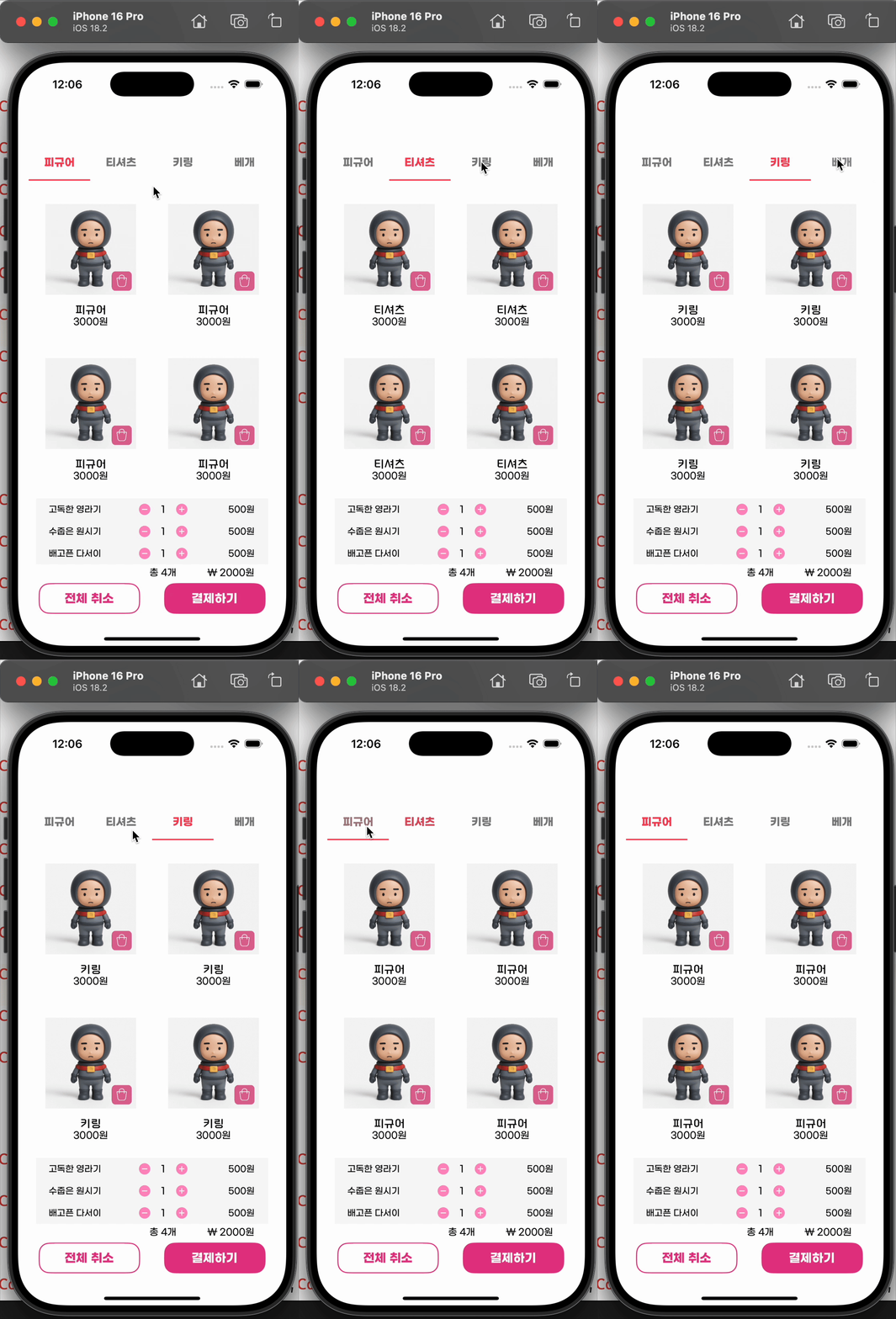
이렇게 하면 이제 segment를 누를 때마다 데이터가 바뀌는 CollectionView가 만들어진다.
'스파르타코딩 클럽 > 팀프로젝트' 카테고리의 다른 글
| 팀프로젝트2 [공유 킥보드 앱 만들기(1) - 디자인, 네이버 Maps API] (0) | 2025.04.26 |
|---|---|
| 팀프로젝트1 [주문 앱 만들기(5) - 데이터 바인딩, 앱 아이콘 적용하기, 앱 이름 한글로 바꾸기] (0) | 2025.04.11 |
| 팀프로젝트1 [주문 앱 만들기(3) - View분리, Merge] (0) | 2025.04.09 |
| 팀프로젝트1 [주문 앱 만들기(2) - UISegmentedControl] (0) | 2025.04.08 |
| 팀프로젝트1 [주문 앱 만들기(1) - 디자인 비하인드, CustomFont] (0) | 2025.04.07 |


