

⎮ 팀 프로젝트 3일차
내가 맡은 지도 View는 현재 위치를 필요로 한다(킥보드를 찾으러 가야하는 컨셉이니까)
그렇다면 현재 위치는 어떻게 가져올 수 있을까?
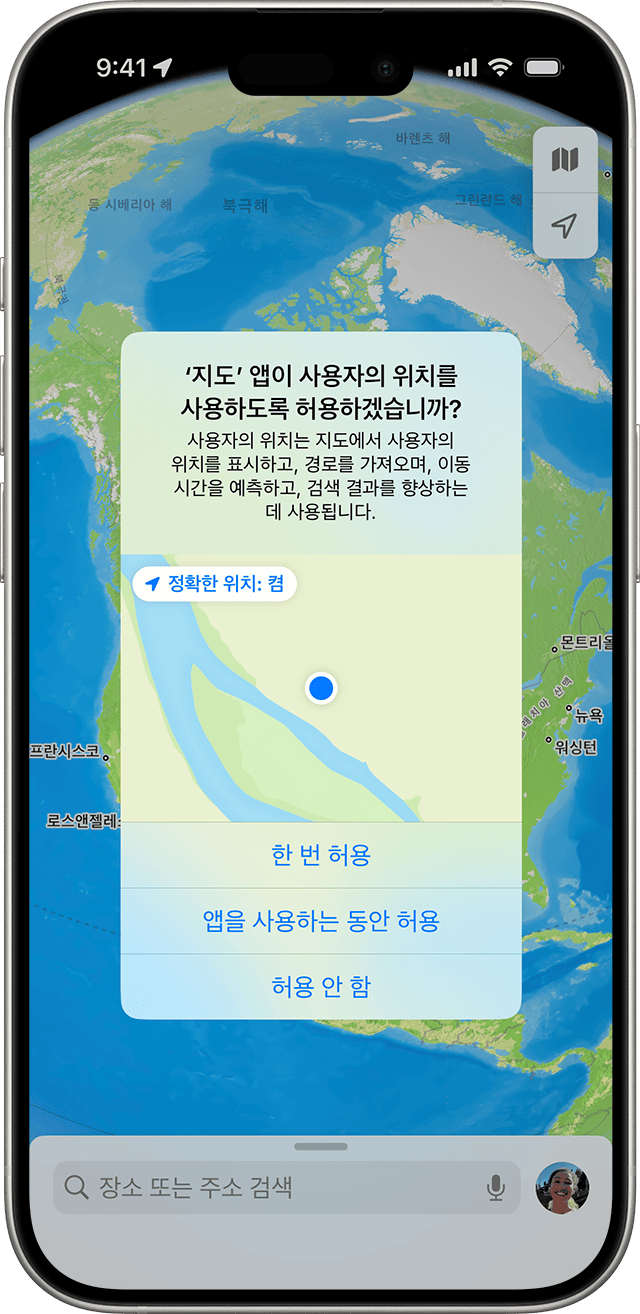
현재 위치를 구현하기에 앞서 우리가 앱을 사용할 때 자주 보던 이 화면, 바로 이 화면을 구현해야 한다.
⎮ CoreLocation
CoreLocation은 장치의 지리적 위치와 방향을 찾는 것이라고 나와 있다
https://developer.apple.com/documentation/corelocation
Core Location | Apple Developer Documentation
Obtain the geographic location and orientation of a device.
developer.apple.com
CoreLocation은 iBeacon device 기기를 기준으로 한 상대적인 위치를 파악하는 서비스(지리적 위치, 고도, 방향 등)를 제공한다
이 프레임워크는 Wi-Fi, 블루투스, GPS 등 기기에서 사용 가능한 모든 구성 요소를 사용하여 데이터를 수집한다.
이러한 데이터는 위치 업데이트나 지역 모니터링, 비콘 거리 측정, 나침반 방위 등에 사용된다.
위치 서비스를 사용하려면 위치 서비스의 업데이트를 요청해도 되는지 승인과 거절 메시지를 띄우게 되고
해당 응답에 따라 서비스를 사용할 수 있다.
이러한 정보는 CLLocationManagerDelegate 통해 받을 수 있다.
이를 위해 CoreLocation을 사용해보..려고 했으나 수많은 시도 끝에 대차게 실패하고 GeoCoding을 먼저 학습했다
⎮ GeoCoding
지오코딩(GeoCoding)은 고유 명칭(주소, 동, 호수 등)을 가지고 위도와 경도의 좌표값을 얻는 것이고,
그 반대인 위도와 경도로 주소를 얻는 것은 리버스 지오코딩(Reverse GeoCoding)이라 한다.
⎮ 네이버 Maps GeoCoding 개요
네이버 Maps도 지오코딩을 제공하는데, 그에 대한 가이드는 아래의 문서를 참고하자
(하단의 링크는 언제든지 변경될 수 있기 때문에, 이미지의 경로로 들어가는 것을 추천한다)
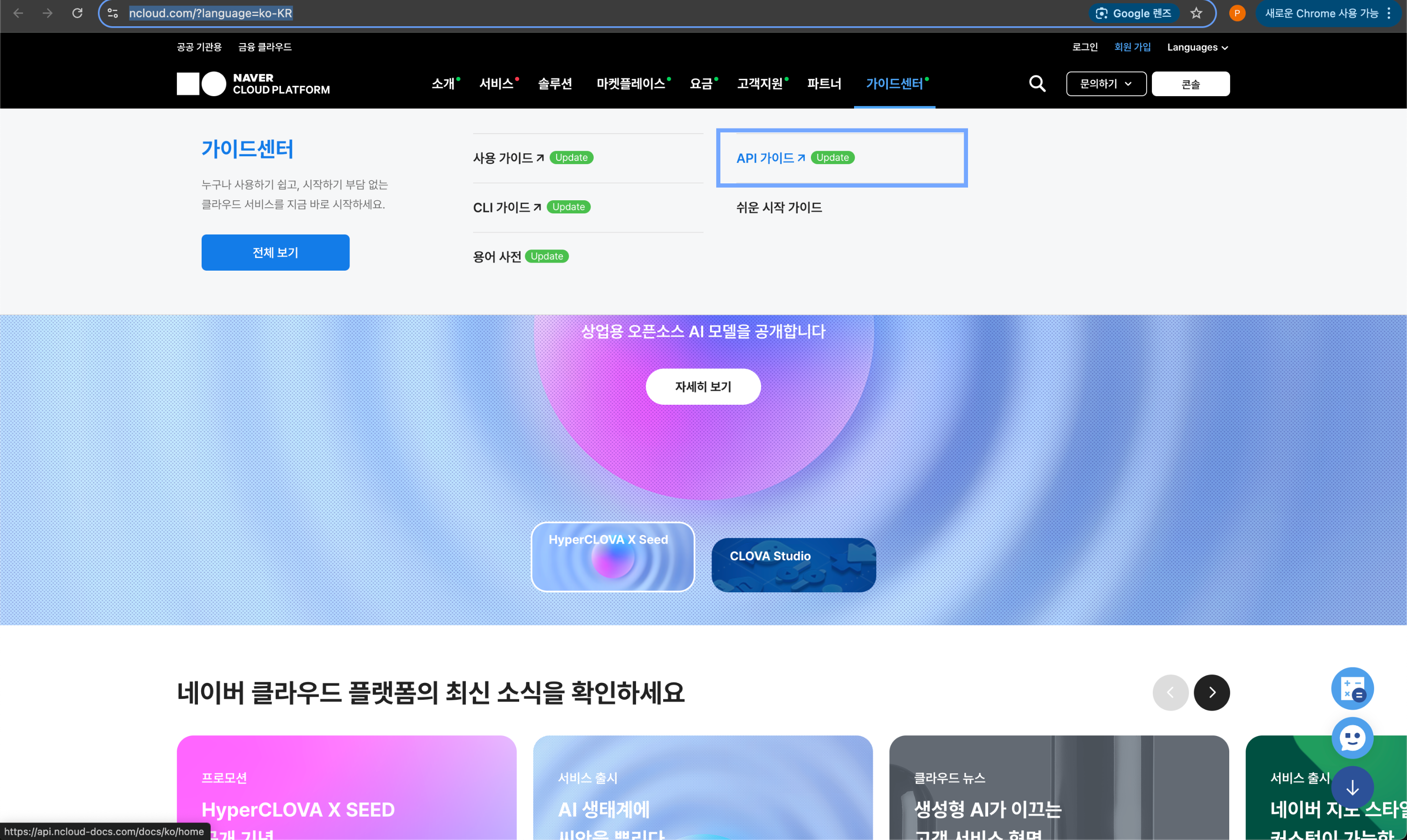
(권장) https://www.ncloud.com/?language=ko-KR
(주의) https://api.ncloud-docs.com/docs/application-maps-overview
Maps 개요
api.ncloud-docs.com
서버와 통신을 하기 위해서
네이버 Maps에서 공통적으로 사용하는 헤더는 반드시 넣어줘야 한다
x-ncp-apigw-api-key-id : 네이버 클라우드 플랫폼 콘솔에서 Application 등록 후 발급받은 Client ID
x-ncp-apigw-api-key : 네이버 클라우드 플랫폼 콘솔에서 Application 등록 후 발급받은 Client Secret
위 2개에 더하여,
우리는 GeoCoding을 할 것이기 때문에 API 가이드의 세부 내용도 따라줘야 한다
메서드 : GET (URI : /geocode)
요청 헤더 : Accept application/json
네이버에서 제공하는 요청 예시는 다음과 같다
curl --location --request GET 'https://maps.apigw.ntruss.com/map-geocode/v2/geocode?query=분당구 불정로 6' \
--header 'x-ncp-apigw-api-key-id: {API Key ID}' \
--header 'x-ncp-apigw-api-key: {API Key}' \
--header 'Accept: application/json'
본격적으로 코드를 사용해서 통신하기 전에,
나는 Postman이라는 API 테스트 툴을 사용하여 내가 이해한 내용이 맞는지 확인하고자 한다

데이터가 잘 넘어오는 것은 확인했으니 코드로 작업을 해보도록 하자
⎮ 네이버 Maps GeoCoding으로 데이터 받아오기
1. strcut로 디코딩할 데이터 모델 만들기
//NaverMapData.swift

// MARK: - NmaverMapData
struct NaverMapData: Codable {
    let status: String
    let meta: Meta
    let addresses: [Address]
    let errorMessage: String
}

// MARK: - Address
struct Address: Codable {
    let roadAddress, jibunAddress, englishAddress: String
    let addressElements: [AddressElement]
    let x, y: String
    let distance: Int
}

// MARK: - AddressElement
struct AddressElement: Codable {
    let types: [String]
    let longName, shortName, code: String
}

// MARK: - Meta
struct Meta: Codable {
    let totalCount, page, count: Int
}
2. 네트워크 통신을 위한 코드 작성(Alamofire 사용)
import Foundation
import Alamofire

class NetworkService {

    // 이 clientID는 본인의 클라이언트 ID를 적으면 된다. 나는 Enum으로 해당 키를 숨기고 gitignore를 했다
    private let clientId = Secret.naverMapApiKey
    private let clientSecret = Secret.naverClientSecret

    // 데이터와 통신하는 메서드. 이 함수를 호출할 때 address에 유저가 입력한 주소가 담긴다
    // 데이터를 튜플 형태로 받기 위해서 (String, String)으로 작성했다
    func fetchDataByAlamofire(address: String, completion: @escaping (Result<(String, String), Error>) -> Void) {
        let scheme = "https"
        let host = "maps.apigw.ntruss.com"
        let path = "/map-geocode/v2/geocode"
        let listQueryItem = URLQueryItem(name: "query", value: "\(address)")

        var components = URLComponents()
        components.scheme = scheme
        components.host = host
        components.path = path
        components.queryItems = [listQueryItem]

        guard let url = components.url else {
            completion(.failure(CustomError.wrongURL))
            return
        }

        // 네이버에서 요구한 header
        let headers: HTTPHeaders = [
            "X-NCP-APIGW-API-KEY-ID": clientId,
            "X-NCP-APIGW-API-KEY": clientSecret,
            "Accept": "application/json"
        ]

        // 데이터를 디코딩하는 부분
        AF.request(url, headers: headers).responseDecodable(of: NaverMapData.self) { response in
            // 넘겨준 data의 결과에서 x, y에 바로 접근하는 것으로 작성했다
            switch response.result {
            case .success(let data):
                if let address = data.addresses.first {
                    let x = address.x
                    let y = address.y
                    print("경도: \(x) , 위도: \(y)")
                    completion(.success((x, y)))
                } else {
                    completion(.failure(CustomError.failDecoding))
                }
            case .failure(let error):
                completion(.failure(error))
            }
        }
    }
}
3. 2번에서 정의한 메서드 사용
import Foundation
import UIKit
import NMapsMap
import CoreLocation

class RentView: UIView {

    { ... }

    private let networkService = NetworkService()

    { ... }
}

extension RentView: UITextViewDelegate {
    { ... }

    // 이 함수는 textView에서 키보드의 return키를 누르면 입력한 것으로 구현하려고, 작성한 함수
    public func textView(_ textView: UITextView, shouldChangeTextIn range: NSRange, replacementText text: String) -> Bool {
        if text == "\n" {

            // 2번에서 정의한 메서드를 여기서 사용
            // address에 textView.text를 넣어주었기 때문에 사용자가 입력한 String 형태의 주소가 전달됨
            networkService.fetchDataByAlamofire(address: textView.text) { result in
                switch result {
                case .success(let result):
                    // 아까 받은 result의 x, y 중 y가 위도이므로 lat이 result.1
                    guard let lat = Double(result.1) else { return }
                    guard let lng = Double(result.0) else { return }
                    let coord = NMGLatLng(lat: lat, lng: lng)

                    // NMFNaverMapView()를 사용할 경우 .mapView로 접근해야 세부 속성에 접근 가능
                    self.myView.mapView.zoomLevel = 16
                    self.myView.mapView.moveCamera(NMFCameraUpdate(scrollTo: coord))

                case .failure(let error):
                    guard let error = error as? CustomError else {
                        print(error) // 위에서 AF.Error로 Type Casting
                        return
                    }
                    print(error) // CustomError
                }
            }
        }
        return true
    }

    // 입력 중 다른 곳을 touch하면 입력이 끝난 것으로 간주하는 메서드
    override func touchesBegan(_ touches: Set<UITouch>, with event: UIEvent?) {
        self.endEditing(true)
    }
}
4. 책임 분리하기
// 기존
    public func textView(_ textView: UITextView, shouldChangeTextIn range: NSRange, replacementText text: String) -> Bool {
        if text == "\n" {
            networkService.fetchDataByAlamofire(address: textView.text) { result in
                switch result {
                case .success(let result):
                    guard let lat = Double(result.1) else { return }
                    guard let lng = Double(result.0) else { return }
                    let coord = NMGLatLng(lat: lat, lng: lng)
                    self.myView.mapView.zoomLevel = 16
                    self.myView.mapView.moveCamera(NMFCameraUpdate(scrollTo: coord))
                    print(coord)
                case .failure(let error):
                    guard let error = error as? CustomError else {
                        print(error) // AF.Error
                        return
                    }
                    print(error) // CustomError
                }
            }
        }
        return true
    }
// 변경 후
public func textView(_ textView: UITextView, shouldChangeTextIn range: NSRange, replacementText text: String) -> Bool {
if text == "\n" {
searchAddress(address: textView.text)
return false
}
return true
}
private func searchAddress(address: String) {
networkService.fetchDataByAlamofire(address: address) { result in
switch result {
case .success(let (x, y)):
self.moveToCamera(lat: x, lng: y)
case .failure(let error):
guard let error = error as? CustomError else {
print(error)
return
}
print(error)
}
}
}
private func moveToCamera(lat: String, lng: String) {
guard let userlat = Double(lat) else { return }
guard let userlng = Double(lng) else { return }
let coord = NMGLatLng(lat: userlat, lng: userlng)
self.myView.mapView.zoomLevel = 16
self.myView.mapView.moveCamera(NMFCameraUpdate(scrollTo: coord))
}
⎮ 트러블 슈팅 : 위도, 경도
위에서 코드별 책임분리를 하고 나서 빌드를 했는데, 다음과 같은 오류가 있었다

다행스럽게도 금방 원인을 찾았는데, 위도와 경도 위치를 바꿔서 입력해주어 바다로 간 것이었다....
// 최종 코드
    public func textView(_ textView: UITextView, shouldChangeTextIn range: NSRange, replacementText text: String) -> Bool {
        if text == "\n" {
            searchAddress(address: textView.text)
            return false
        }
        return true
    }

    private func searchAddress(address: String) {
        networkService.fetchDataByAlamofire(address: address) { result in
            switch result {
            case .success(let (x, y)):
                self.moveToCamera(lat: y, lng: x)
            case .failure(let error):
                guard let error = error as? CustomError else {
                    print(error)
                    return
                }
                print(error)
            }
        }
    }

    private func moveToCamera(lat: String, lng: String) {
        guard let userlat = Double(lat) else { return }
        guard let userlng = Double(lng) else { return }
        let coord = NMGLatLng(lat: userlat, lng: userlng)
        self.myView.mapView.zoomLevel = 16
        self.myView.mapView.moveCamera(NMFCameraUpdate(scrollTo: coord))
    }
데이터를 받아올 때 x가 위도인지 경도인지 잘 확인하도록 하자..
우리나라의 경우 작은 값이 위도!
tmi. 대한민국의 위도는 33°(마라도)~ 43°(온성군), 경도는 124°11(마안도) ~131°52(독도)에 걸쳐 있다.
'스파르타코딩 클럽 > 팀프로젝트' 카테고리의 다른 글
| 팀프로젝트3 [날씨 앱 만들기(1) - 앱 기획] (0) | 2025.05.24 |
|---|---|
| 팀프로젝트2 [공유 킥보드 앱 만들기(4) - 네이버 커스텀 마커, 버튼 이벤트] (0) | 2025.05.01 |
| 팀프로젝트2 [공유 킥보드 앱 만들기(2) - UITabBarController] (0) | 2025.04.28 |
| 팀프로젝트2 [공유 킥보드 앱 만들기(1) - 디자인, 네이버 Maps API] (0) | 2025.04.26 |
| 팀프로젝트1 [주문 앱 만들기(5) - 데이터 바인딩, 앱 아이콘 적용하기, 앱 이름 한글로 바꾸기] (0) | 2025.04.11 |


